




SharePoint has always been the place where companies store files, share knowledge, and collaborate. But what if SharePoint could do more than just hold information? What if it could actively help your employees, guide them, and make their day easier?
That’s exactly what Copilot Agents in SharePoint are designed to do. They are AI-powered assistants that live inside your Microsoft 365 environment — ready to answer questions, support workflows, and boost productivity across your organization.
What are Copilot Agents?
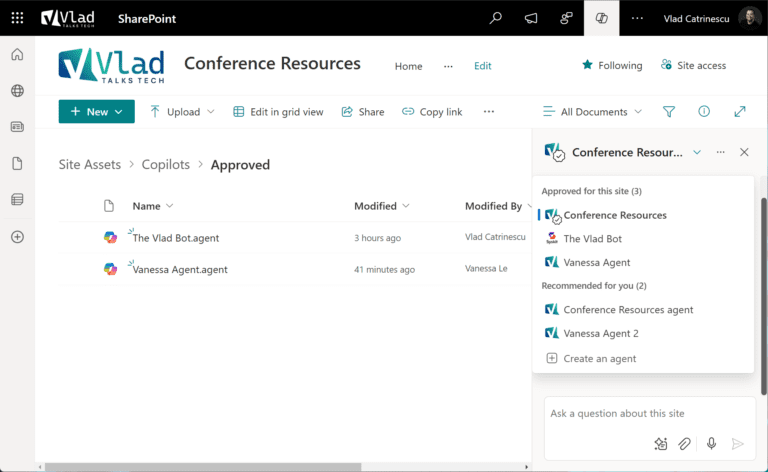
Think of them as digital helpers built specifically for your company. You can create an agent that understands your processes, knows your policies, and can interact with employees in plain language.
They can:
Act as an FAQ bot, giving instant answers to repeated questions.
Guide employees step-by-step through complex processes.
Offer personalized onboarding for new hires.
Provide quick access to the right documents at the right moment.
And the best part? They can be set up with no coding skills required.
Real-Life Scenarios Where Agents Shine
HR Assistant
Instead of your HR team answering the same questions again and again (“How many vacation days do I have left?” or “Where’s the benefits form?”), an agent provides instant, accurate answers — available 24/7.Onboarding Guide
New employees often feel lost during their first weeks. A Copilot Agent in SharePoint can walk them through IT setup, company policies, and even where to find templates and tools, making onboarding smoother and faster.Project Knowledge Hub
For large projects, an agent can act as the central brain — pointing team members to the right documents, deadlines, and updates, ensuring no one misses critical information.IT & Support Helper
Instead of opening tickets for small issues, employees can ask a Copilot Agent how to reset a password, install software, or troubleshoot basic problems — reducing pressure on the IT helpdesk.
Security and Governance Built-In
A common question from business leaders is: “Is this safe?”
The answer is yes. Because these agents are part of the Microsoft 365 ecosystem, they follow your existing compliance and security policies.
Admins can:
Monitor every agent.
Approve or block agents before they go live.
Control what data each agent can access.
Review usage reports to ensure everything is aligned with company policy.
This balance of innovation + governance means you get the benefits of AI without losing control of your data.
How We Can Help You Implement Copilot Agents
At 365 Digital, we specialize in helping businesses make the most of Microsoft 365, SharePoint, and Power Platform. With Copilot Agents, our services include:
Assessment & Strategy – We identify which departments will benefit most from agents and design a roadmap tailored to your needs.
Custom Agent Creation – We build agents that reflect your unique processes and company culture.
Governance Setup – We configure approval workflows and security measures so every agent is safe and compliant.
Employee Training – We train your staff to use and manage agents confidently.
Ongoing Optimization – We monitor usage and continuously improve your agents as your business grows.
Time to Take the Next Step
Microsoft’s Copilot Agents in SharePoint are here, and businesses that start early will gain the biggest advantage. They don’t just store your information — they work for you.
If you want to make your company smarter, more efficient, and more future-ready, now is the time.
📩 Contact us today and let’s build your first Copilot Agent together.